Discord 2FA Scams: New Social Engineering Alert
Advertisements
New social engineering scams on Discord are tricking users with fake 2-Factor Authentication prompts, aiming to gain unauthorized access to accounts and sensitive information. Users must remain vigilant and verify all security requests directly within the Discord application.
In the evolving landscape of digital communication, platforms like Discord have become central hubs for communities, gamers, and professionals alike. However, with increased popularity comes increased attention from malicious actors. An urgent alert has been issued regarding sophisticated new social engineering scams on Discord that specifically target users with fake 2-Factor Authentication (2FA) prompts. These cunning tactics aim to bypass even the most robust security measures if users are not acutely aware and cautious.
The Rise of Sophisticated Social Engineering on Discord
Social engineering remains one of the most effective methods for cybercriminals to compromise accounts, leveraging human psychology rather than technical vulnerabilities. On Discord, this threat has taken a new, more insidious form, focusing on tricking users into believing their 2FA is compromised or requires immediate re-verification. These scams are designed to appear incredibly convincing, often mimicking Discord's legitimate interface and communication styles.
The attackers meticulously craft messages that create a sense of urgency or fear, prompting users to act without thoroughly scrutinizing the request. They understand that most users rely on 2FA for enhanced security, making it a prime target for exploitation. By presenting fake 2FA prompts, they aim to harvest legitimate 2FA codes or credentials, effectively gaining full access to a user's account.
Understanding the Mechanics of Fake 2FA Prompts
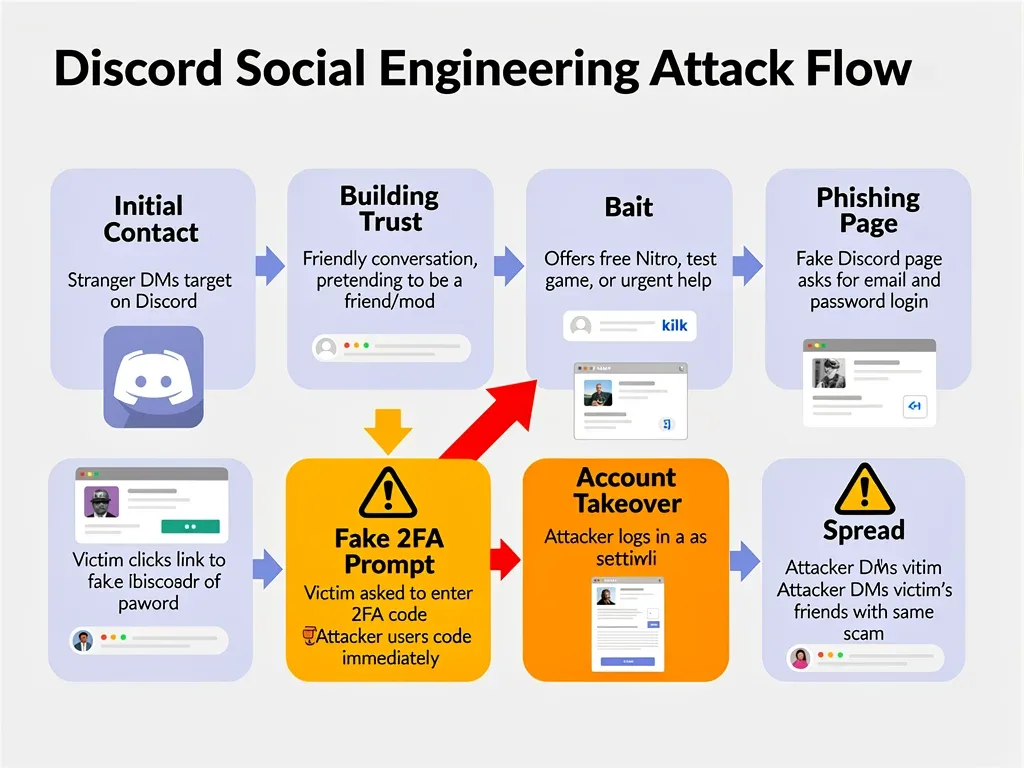
At the core of these scams is deception. Attackers don't hack Discord's systems; instead, they manipulate users into voluntarily giving up their security information. They might use phishing links, direct messages, or even compromised accounts to initiate contact.
Initial Contact: Scammers often initiate contact through direct messages, server announcements, or even by impersonating friends whose accounts have already been compromised.
Urgency Creation: Messages frequently warn of unauthorized login attempts, account suspension, or other critical issues, demanding immediate action to 'secure' the account.
Phishing Link: A fraudulent link is provided, leading to a fake Discord login page or a page designed to mimic a 2FA verification process.
Credential Harvesting: On the fake page, users are prompted to enter their Discord username, password, and crucially, their 2FA code.
This elaborate setup creates a believable scenario, making it difficult for unsuspecting users to differentiate between a genuine security alert and a malicious attempt. The psychological manipulation preys on our natural instinct to protect our digital assets.
Common Tactics Used in Discord 2FA Scams
Scammers are constantly refining their techniques, but several common tactics stand out in these fake 2FA prompt scams. Recognizing these patterns is the first line of defense against falling victim. They often leverage a combination of technical mimicry and psychological pressure to achieve their goals.
One prevalent method involves impersonating Discord support or an official bot. These fake entities send messages claiming a security breach or unusual activity has been detected on the user's account. The message typically includes a link that, when clicked, directs the user to a meticulously crafted phishing site designed to look identical to Discord's official login or 2FA verification page. The goal is to trick users into entering their credentials and 2FA code, which the scammers then capture and use to log into the legitimate account.
Identifying Suspicious Messages and Links
Vigilance is paramount. Always be skeptical of unsolicited messages, especially those demanding immediate action. Look for subtle inconsistencies that reveal the scam's true nature.
Sender Verification: Always check the sender's username, tag, and profile. Official Discord communications will come from specific, verified sources, not random users or newly created accounts.
Link Scrutiny: Hover over any links before clicking them. Legitimate Discord links will always begin with
discord.comordiscordapp.com. Be wary of variations, misspellings, or unexpected subdomains.Grammar and Spelling: While not foolproof, many phishing attempts contain grammatical errors or awkward phrasing that legitimate communications typically do not.
Urgency and Threat: Messages that create extreme urgency, threaten account deletion, or promise unrealistic rewards should be viewed with extreme suspicion.
These details, often overlooked in the rush to respond to a perceived threat, are crucial indicators of a scam. Taking a moment to pause and examine the message can prevent significant security compromises.
How Fake 2FA Prompts Compromise Accounts
The ultimate goal of these fake 2FA prompts is to gain unauthorized access to a user's Discord account. Once an attacker has access, they can cause significant damage, ranging from spreading malware to stealing personal information. The process is deceptively simple from the attacker's perspective, relying entirely on the victim's unwitting cooperation.
When a user falls for the fake prompt and enters their credentials and 2FA code on the phishing site, the scammer immediately captures this information. Since 2FA codes are time-sensitive, the attacker typically uses an automated script to input these stolen credentials into the legitimate Discord login page within seconds. This allows them to bypass the real 2FA challenge and gain full control of the account. Once inside, they can change passwords, remove legitimate 2FA settings, and lock the rightful owner out.
Consequences of Account Compromise
The fallout from a compromised Discord account can be extensive, affecting not just the individual but also their network of contacts.
Personal Data Theft: Access to private messages, linked accounts, and other personal information.
Malware Distribution: The compromised account can be used to send malicious links or files to friends and server members, spreading the attack further.
Financial Fraud: If linked to payment services or used for transactions, financial information can be stolen or misused.
Reputational Damage: The attacker might post inappropriate content or engage in disruptive behavior, damaging the user's reputation within their communities.
Server Takeovers: If the compromised account has administrative privileges on servers, attackers can take control, ban members, or spread propaganda.
Understanding these severe consequences underscores the importance of stringent security practices and skepticism towards any unexpected security prompts.
Protecting Yourself from Discord 2FA Scams
Safeguarding your Discord account requires a proactive and informed approach. While scammers innovate, so too do security measures and user awareness. The best defense is a combination of strong security habits and an understanding of how these scams operate. It's not enough to enable 2FA; you must also understand how to protect it.
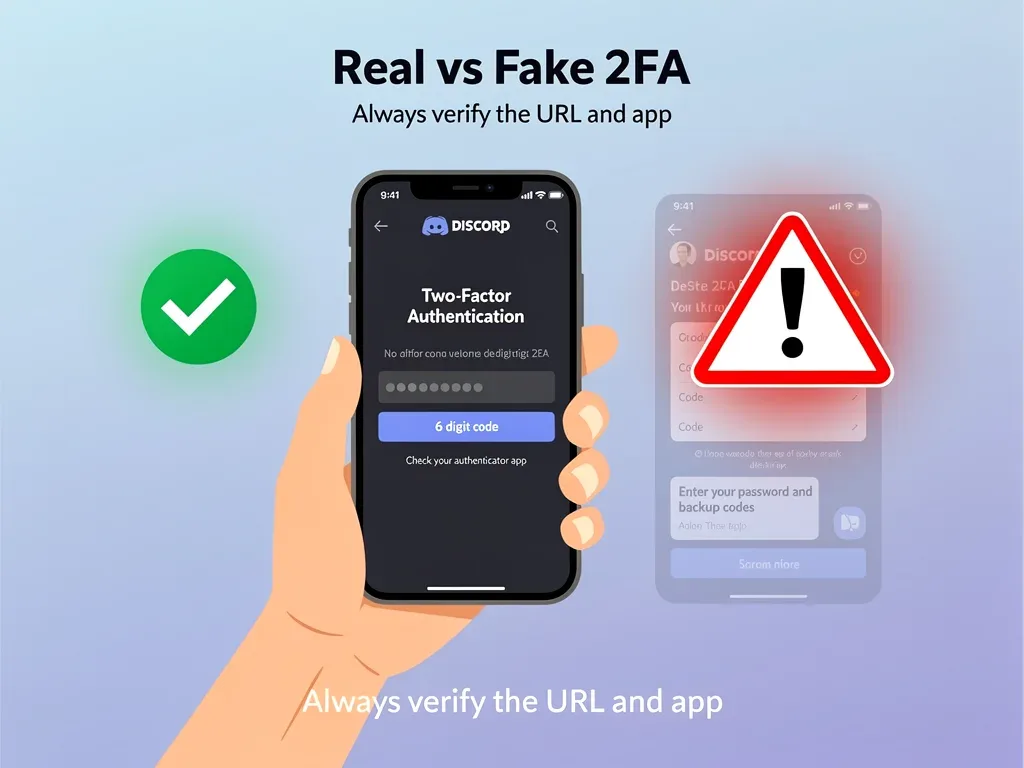
The most critical step is to never enter your 2FA code or login credentials on a page accessed via a link. Always navigate directly to Discord's official website or use the official desktop or mobile application for any security-related actions. If you receive a message claiming a security issue, do not click any links. Instead, close the message, open your Discord application, and check your account settings or official notifications for any legitimate alerts. Discord will typically notify you directly within the app for critical security matters, not through unsolicited DMs with external links.
Best Practices for Discord Security
Implementing a few key practices can significantly reduce your vulnerability to social engineering attacks.
Enable 2FA (and understand it): While the scam targets 2FA, having it enabled is still crucial. Ensure you understand that 2FA codes are generated by an authenticator app (like Google Authenticator or Authy) or sent via SMS (though app-based 2FA is more secure).
Use Strong, Unique Passwords: A complex password for your Discord account, different from passwords used on other sites, adds an essential layer of protection.
Be Skeptical of Unsolicited Messages: Treat any unexpected message, especially from unknown users or those demanding urgent action, with extreme caution.
Verify Sources: If a message claims to be from Discord support or a trusted entity, verify its authenticity through official channels before taking any action.
Report Suspicious Activity: If you encounter a scam attempt, report the user or server to Discord support immediately. This helps protect others.
Regularly Review Account Activity: Periodically check your Discord account's authorized devices and login history for any unfamiliar activity.
By integrating these practices into your routine, you create a robust defense against the sophisticated tactics of social engineers.
What to Do If You Suspect a Scam or Are Compromised
Even with the best precautions, it's possible to encounter a social engineering attempt. Knowing how to react quickly can minimize potential damage. If you suspect a message is a scam or, worse, if you believe your account has been compromised, immediate action is crucial. Time is of the essence in these situations, as attackers move quickly to exploit their access.
If you receive a suspicious message but haven't clicked any links or entered any information, the best course of action is to simply delete the message and block the sender. Do not engage with them. If you accidentally clicked a suspicious link but did not enter any information, immediately close the tab or browser. If you did enter your credentials or 2FA code on a fake site, assume your account is compromised and proceed to the steps below without delay.
Steps to Take After a Potential Compromise
Acting swiftly can often mitigate the impact of a successful social engineering attack.
Change Your Password Immediately: If you can still access your account, change your Discord password to a strong, unique one.
Disable/Re-enable 2FA: If your 2FA was compromised, disable it and then re-enable it to generate new codes. If you cannot access your account, utilize Discord's account recovery process.
Revoke Authorized Devices: In Discord settings, review and revoke access for any unfamiliar authorized devices.
Inform Your Contacts: Notify your Discord friends and server administrators that your account may have been compromised and to ignore any suspicious messages from it.
Report to Discord Support: Contact Discord support with all relevant details, including screenshots of the scam messages and any suspicious activity.
Check Linked Accounts: If your Discord account is linked to other services (e.g., Steam, Epic Games), change those passwords as well, especially if you used the same password.
These actions are vital for regaining control of your account and preventing further spread of the compromise.
The Broader Impact on Online Communities and Trust
Beyond individual account compromises, the proliferation of social engineering scams, particularly those targeting critical security features like 2FA, erodes trust within online communities. Discord thrives on interaction and shared experiences, but a constant threat of deception can make users hesitant to engage, communicate, or even trust legitimate security alerts. This broader impact affects the platform's ecosystem and the user experience for everyone.
When users become wary of every message or link, the spontaneity and openness that characterize platforms like Discord diminish. It forces a more guarded approach to online interactions, which, while necessary for security, can also hinder community building and genuine connection. The onus then falls on both the platform providers and the user base to foster an environment where security is paramount without stifling legitimate communication. Education and awareness become key tools in rebuilding and maintaining that trust.
Fostering a Secure Online Environment
Creating a truly secure online space is a collective responsibility, requiring continuous effort from all stakeholders.
Platform Responsibility: Discord, like other platforms, must continuously update its security protocols, improve detection of malicious activity, and provide clear, accessible resources for users to report and learn about scams.
Community Vigilance: Server administrators and community leaders play a crucial role in disseminating information about new threats and encouraging safe practices among their members.
User Education: Regular education campaigns, like this article, are essential to keep users informed about the latest scam tactics and how to protect themselves.
Peer Support: Encouraging users to help each other identify and report scams builds a stronger, more resilient community.
By working together, we can create a digital environment where the benefits of platforms like Discord can be enjoyed with greater peace of mind, despite the persistent threat of social engineering.
Staying Ahead of Cybercriminals: Continuous Learning
The cat-and-mouse game between cybercriminals and security professionals is never-ending. As new defenses are developed, attackers devise new ways to circumvent them. This constant evolution means that staying secure online is not a one-time task but an ongoing process of learning and adaptation. For Discord users, this translates to keeping abreast of the latest scam trends and understanding the subtle shifts in social engineering tactics. What worked for scammers yesterday might be less effective today, but a new, more sophisticated approach could emerge tomorrow.
One of the most effective strategies for staying ahead is to cultivate a mindset of healthy skepticism. Always question unexpected requests, especially those related to account security or personal information. Assume that any message asking for your login details or 2FA code outside of Discord's direct, in-app interface is suspicious. Regularly checking official Discord security blogs, reputable cybersecurity news sources, and community forums can provide early warnings about emerging threats. Knowledge truly is power when it comes to defending against these cunning attacks.
Resources for Ongoing Security Awareness
Leveraging available resources can significantly enhance your personal cybersecurity posture.
Official Discord Security Blog: Keep an eye on Discord's official announcements for security updates and warnings.
Cybersecurity News Outlets: Follow reputable cybersecurity news sites that report on the latest threats and vulnerabilities across various platforms.
Community Security Channels: Participate in Discord servers or communities dedicated to cybersecurity and online safety, where users share information and tips.
Educational Workshops/Webinars: Many organizations offer free resources and training on identifying and preventing social engineering attacks.
By actively seeking out and absorbing this information, you empower yourself to recognize and neutralize threats before they can cause harm, ensuring your Discord experience remains secure and enjoyable.
Key Point | Brief Description |
|---|---|
Fake 2FA Prompts | Scammers use convincing fake prompts to steal Two-Factor Authentication codes. |
Social Engineering Tactics | Attackers exploit trust and urgency through phishing, impersonation, and deceptive links. |
Protection Measures | Always verify senders, scrutinize links, and use official Discord apps for security actions. |
Responding to Compromise | Change passwords, re-enable 2FA, inform contacts, and report to Discord support immediately. |
Frequently Asked Questions About Discord Security
What are Discord social engineering scams?▼
Discord social engineering scams are deceptive tactics used by cybercriminals to trick users into revealing sensitive information, such as login credentials or 2FA codes. They often involve impersonating official entities or trusted contacts to gain a user's trust and manipulate them into performing actions that compromise their account security.
How do fake 2FA prompts work on Discord?▼
Scammers send messages with links leading to fake Discord login pages that mimic the real one. When a user enters their username, password, and 2FA code on this fraudulent site, the scammer captures the information and uses it immediately to access the legitimate account, bypassing the real 2FA.
What should I do if I receive a suspicious Discord message?▼
If you receive a suspicious message, especially one asking for login details or 2FA codes, do not click any links. Verify the sender, look for inconsistencies in the URL, and check for grammar errors. If unsure, navigate directly to Discord's official website or app to check for legitimate notifications.
How can I protect my Discord account from these scams?▼
Enable 2FA using an authenticator app, use strong and unique passwords, and be highly skeptical of unsolicited messages. Always verify links by hovering over them and ensure you are on Discord's official domain before entering any credentials. Report suspicious activity to Discord support.
My Discord account was compromised, what now?▼
Immediately change your password, disable and re-enable 2FA, and revoke authorized devices. Inform your friends and server admins about the compromise and report the incident to Discord support. Also, check any linked accounts for suspicious activity and change those passwords as well.
Conclusion
The emergence of new social engineering scams on Discord, specifically those exploiting fake 2-Factor Authentication prompts, serves as a critical reminder of the persistent threats in our digital lives. While the tactics employed by cybercriminals become increasingly sophisticated, our most potent defense remains vigilance, education, and adherence to robust security practices. By understanding how these scams operate, recognizing their tell-tale signs, and knowing the steps to take in case of an encounter or compromise, Discord users can significantly enhance their online safety. Staying informed and exercising caution are not just recommendations; they are essential actions for navigating the evolving landscape of online security and protecting our digital identities and communities.
